A Live Call Quality Indicator on the Dialler
A green pill on the dialler shows your connection is healthy; amber means it's struggling. Entirely local to your browser, with no data sent back.
 Author
Iqbal Abdullah
Author
Iqbal Abdullah
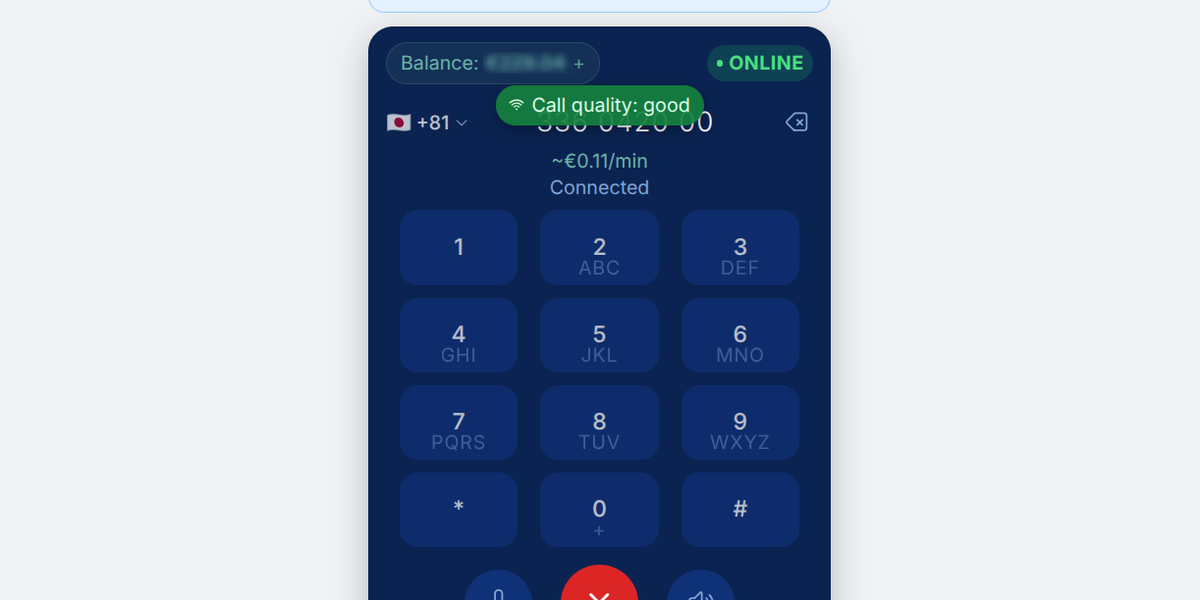
We just released a small improvement to the dialler. It's our call-quality monitoring "pill".
When a PuchiDen call connects, a small pill now appears between your balance and the number you dialled. Green, it reads "Call quality: good". If your internet connection starts to struggle, it turns amber and says "Connection unstable...". When the line settles, it turns back to green on its own. Nothing to click, nothing to dismiss.
Why green is the normal state
The pill appears the instant the call connects, not because something is wrong. An indicator that only shows up when things break startles you, and its silence tells you nothing. Green throughout means amber actually carries information when it appears, and no amber is a good sign rather than an unknown.
It turns amber when the connection between your browser and us gets patchy — the kind of thing that makes a voice sound choppy a few seconds later. It turns back to green once the connection stays clean for three seconds.
It is deliberately slow to react. A problem has to last a full second before the pill changes colour, and the connection has to stay clean for three seconds before it goes back to green. A momentary hiccup nobody would even hear never reaches the screen.
It only reports on the half of the call you can actually do something about: your own internet connection. It stays quiet while the phone on the other end is still ringing, and only starts once someone picks up.
What it means for you
"Is it me or is it them?" is the question every bad call raises. The pill answers it while the call is still going. Green while the call sounds rough means the problem is on the other end — their handset, their room, their phone company. Amber means it is your side, and there is something you can do about it: move closer to the router, switch from WiFi to mobile data, or hang up and redial to get a cleaner route.
Nothing about this leaves your browser. The pill is worked out and shown entirely on your own device. No quality measurements are sent back to us, nothing is recorded against your account, and — as always — no call audio is recorded, stored, or analysed.